How ReconAI cut procurement document reconciliation from hours to minutes
A builder's guide by Saad Inam
A builder's guide to building a document-reconciliation web app on Providus DocAI, by Saad Inam.
TL;DR
ReconAI is a document-reconciliation web app built on top of Providus's Document Intelligence layer (DocAI). You upload a purchase order, a goods receipt, and an invoice. DocAI parses each file into structured segments (text, tables, and geometry). A reasoning LLM then reconciles the set in a single streaming call, flagging discrepancies across eight finding categories, and the app returns a severity-ranked findings report where every discrepancy carries clickable evidence down to the exact line in the source PDF, plus a supplier follow-up email drafted from the same response.
- Upload to report in one pass: documents in, decisions out, no spreadsheet cross-checking in between.
- Eight finding categories: quantities, unit prices, totals, missing and extra line items, unsupported charges, calculation errors, and more.
- Line-level evidence: every finding cites verbatim quotes from the source PDFs, and the viewer highlights the exact table row or text line, not just a matched cell.
- Supplier emails written in the same call: one follow-up email per vendor, drafted by the same model pass that produced the findings, so the email can never drift from the report.
- A BFF-only security model: the browser never holds upstream API keys; every request goes through the app's backend with session validation and a path allowlist.
The repo is at https://github.com/saadmemon1/ReconAI.
The problem: reconciliation still runs on spreadsheets and human eyes
Every purchase-to-payment cycle ends the same way. Procurement has a purchase order, the warehouse has a goods receipt, and the supplier sends an invoice. Somewhere, a person opens three PDFs side by side and checks: does the invoice unit price match the agreed PO price? Was everything on the PO actually received? Does the math add up? Does the invoice total what was delivered, or what the vendor wishes was delivered?
That person is doing what the industry calls three-way matching. It is tedious, slow, and error-prone. When a discrepancy slips through, the business pays too much. In our market research calls, supply chain practitioners told us a single unresolved discrepancy costs roughly $100 to $115 per document once you count follow-up, credit notes, and the finance team's time. And the businesses doing this by hand are often exactly the ones that cannot afford an ERP module with built-in matching. Spreadsheet-and-eyeballs reconciliation is not a small-batch problem; it is the default for a large share of procurement teams.
The documents make it worse. Invoices, POs, and receipts arrive as handwritten notes, scanned copies, and digital-born PDFs, in single and multi-column layouts, sometimes bilingual. The pain is not document length. It is that the documents follow no reliable format.
Why Providus DocAI for procurement documents
Providus's Document Intelligence layer exists to solve the reading problem first. It runs documents through a five-stage lifecycle (parse, extract, split, classify, redact), returns per-field confidence scores, and grounds every answer in the source document with a citation. For ReconAI, the important part is that DocAI returns the parsed document as structured segments:
- each segment carries its markdown text plus coordinates in a normalized 1000x1000 page space,
- table segments carry their cells, each with text, a bounding box, and a row/column position,
- and when DocAI's equal-width grid misplaces uneven columns, the engine re-estimates column boundaries from text lengths.
Template-based OCR breaks on layout variation, and rule-based parsers need per-vendor configuration. DocAI reads structure semantically instead of by template, so one pipeline handles a handwritten GRN and a digital-born invoice without per-document setup. That single property is what made the rest of ReconAI possible: the same segment geometry that feeds the LLM prompt also feeds the evidence viewer's highlight boxes.
Architecture overview
ReconAI is one pipeline: documents in, decisions out. The architecture diagram below shows the four stages and the two flows that reuse the same parsed segments.
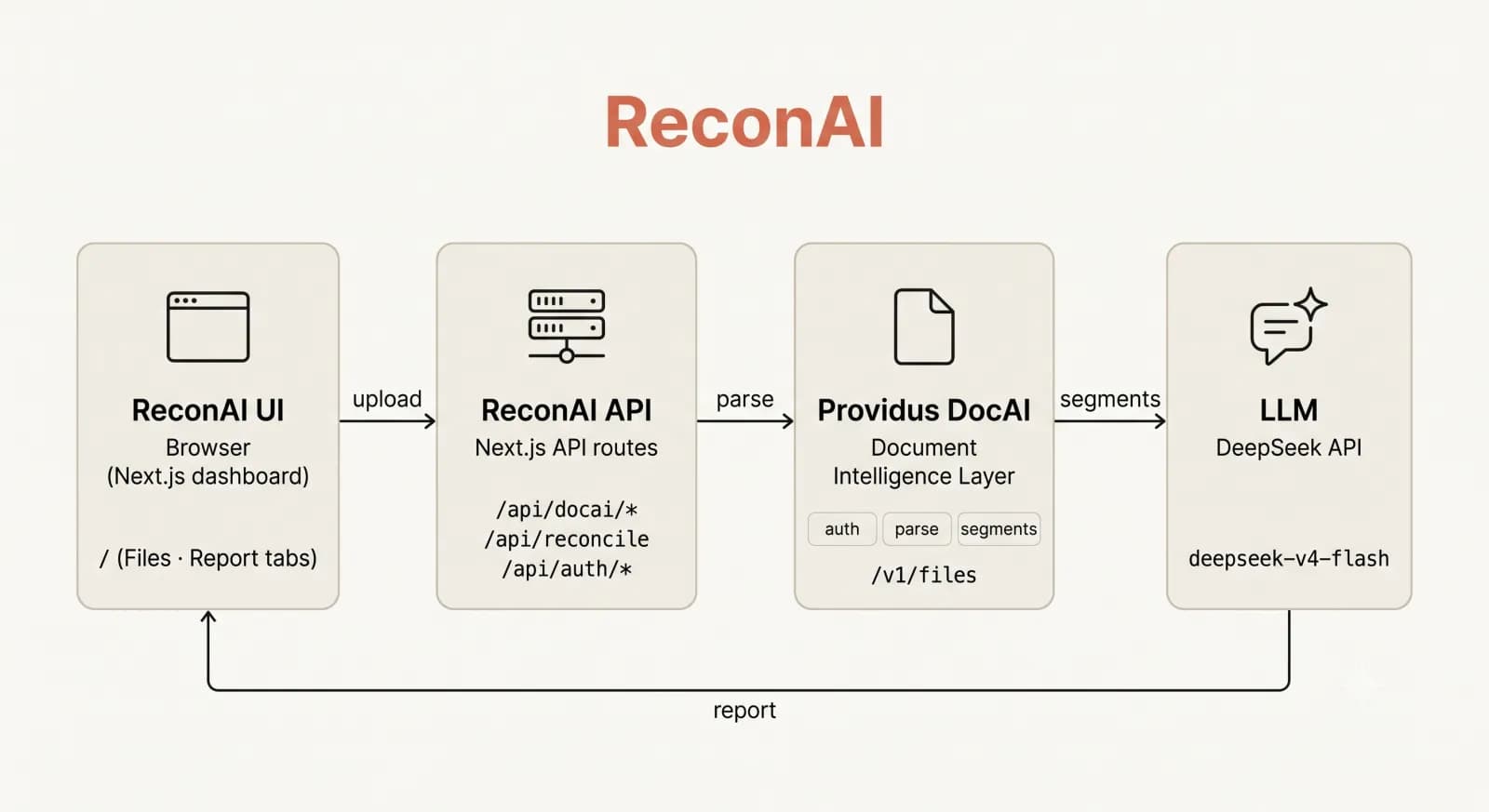
ReconAI architecture: upload through the app's BFF, parse via Providus DocAI into segments, reconcile with one LLM call, and review findings with clickable evidence. The same segments feed both the prompt and the evidence viewer.
| Layer | Pieces | Responsibility |
|---|---|---|
| Frontend | Files tab, reconcile runner, report viewer, evidence viewer | All screens. No API keys, no direct upstream calls; everything goes through the BFF. |
| BFF (API routes) | Next.js API routes with session validation and a path allowlist | Authenticates the session, validates every requested DocAI path, relays requests. |
| Document intelligence | Providus DocAI | Parses PDFs and images into segments (text, tables, geometry). |
| Reconcile engine | Pure, unit-tested TypeScript | Builds the prompt, calls the LLM, parses and sanitizes the JSON report, derives every money figure in code. |
| LLM provider | DeepSeek cloud or a local model server | Runs the single reconciliation call, streams reasoning live. |
| Evidence viewer | pdfjs-dist + three.js | Renders cited PDFs in the browser, locates citations in the PDF text layer, draws line-level highlights, orbits cited files. |
Three one-line flows complete the picture:
- Evidence: finding -> citation -> PDF text layer -> line-level highlight (DocAI segment row as fallback).
- Emails: supplier draft written in the same LLM response as the report -> Copy or open in mail app.
- Security: the browser only ever talks to the BFF; no upstream keys reach the client.
Step 1: Upload and parse with Providus DocAI
Uploads (PDFs and images) go through the BFF to Providus DocAI and parse in the background. The Files tab shows live parse state, and parse status is server-authoritative, so a file counts as parsed only when DocAI's parse job actually completed.
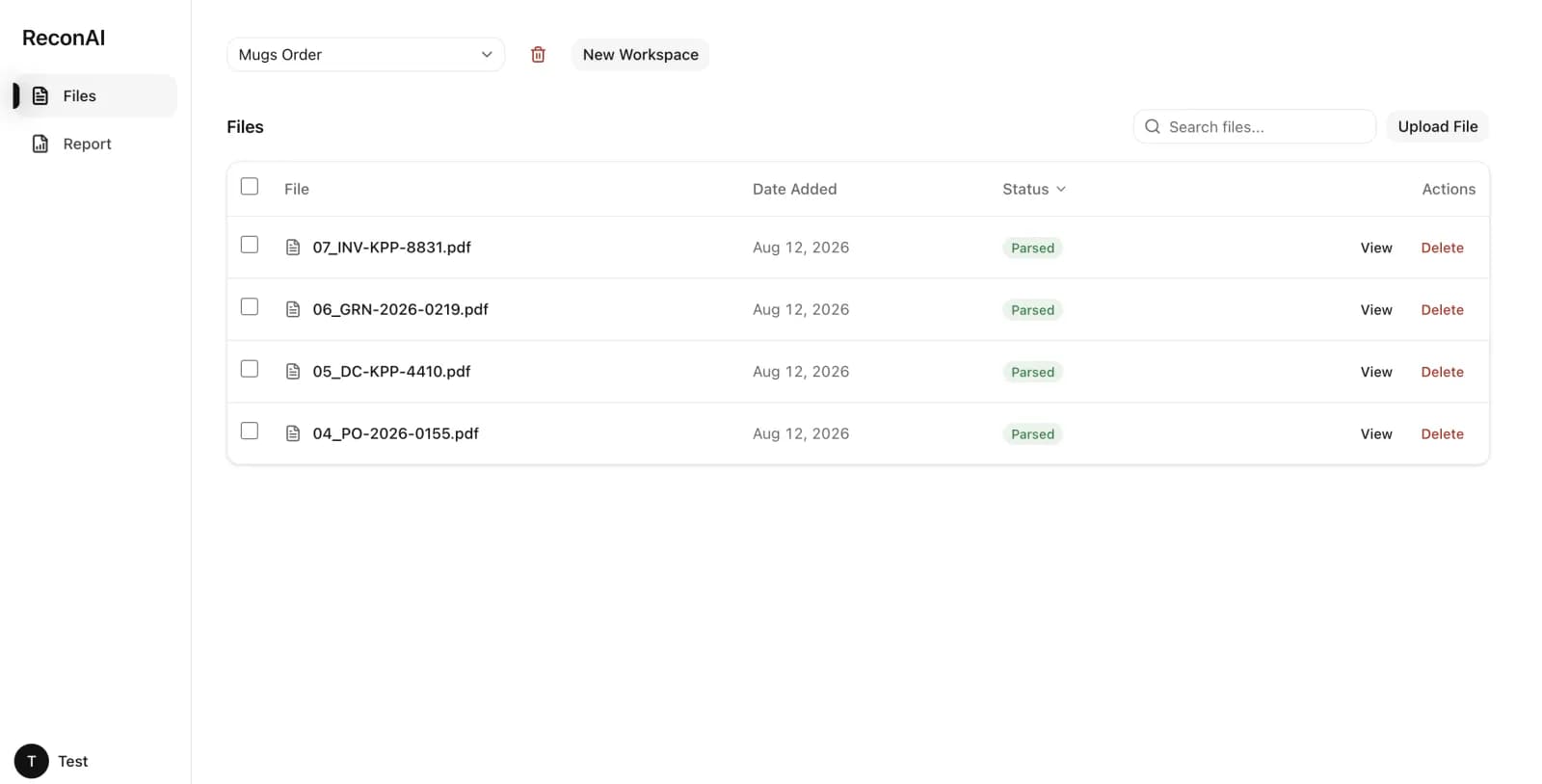
The Files tab: dense, Drive/Linear-style document table with parse status chips and per-row PDF preview.
When parsing finishes, the app fetches the document's segments, the structured representation described above. Two properties of that representation matter for what comes next.
Segments feed both halves of the app. The same segment text is embedded in the LLM prompt (tagged as untrusted data, more on that in Step 5), and the same segment geometry is used by the evidence viewer to locate citations. There is no second parsing pipeline and no drift between what the model reasoned over and what the user sees highlighted.
The geometry is real geometry. Coordinates live in a normalized 1000x1000 page space, and table cells carry their own bounding boxes. That is what lets the viewer later draw a box around the exact table row that contains a disputed figure instead of guessing from the text alone.
Step 2: The reconciliation engine: one call, eight finding categories
The reconcile route builds a prompt from the parsed segments and makes exactly one LLM call. That call returns one JSON document containing document classifications, document groups, KPIs, findings, unmatched documents, a summary, supplier emails, and email drafts. Everything a reviewer needs comes back in a single response, streamed as SSE with the model's reasoning deltas forwarded live so the user can watch the audit think.
Discrepancies land in one of eight finding categories:
| Finding category | What it catches |
|---|---|
| overbilling | Invoice charges exceed PO agreed prices |
| quantity_mismatch | Quantities differ between documents |
| price_mismatch | Unit prices differ between documents |
| missing_item | Item in the PO but not in the receipt or invoice |
| extra_item | Item in the invoice with no PO line |
| unsupported_charge | Invoice line item with no PO match at all |
| evidence_gap | Invoice quantity exceeds what was actually received |
| calculation_error | quantity x unit_price != total on any document |
Each finding is severity-ranked (critical, high, medium, low) with tolerance rules: price and quantity differences under 5% of PO value are acceptable, and rounding differences under the local half-currency unit are ignored. The prompt also forces deduplication (the same root cause viewed from two document pairs is one finding, not two) and mandates an exact citation format for every finding:
"<file name>: <location hint>: '<verbatim 5-40 char quote>' [reason: <brief why>]"
The citation format is the contract that powers the whole evidence system: the file name attaches the finding to the right document, the verbatim quote is located in the PDF text layer, and the reason suffix (never part of the quote) is shown next to the citation so a reviewer sees in one line why that row is evidence.
The engine owns the arithmetic. The summary line "Billed minus Overbilled = Recommended payable" is computed in code from the structured KPI data. The LLM writes narrative only and is explicitly told not to state totals. Early versions let the model do the math, and its prose sums drifted. Moving every money figure into typed code made the report reproducible, which is the difference between a report a finance team trusts and one they re-check by hand.
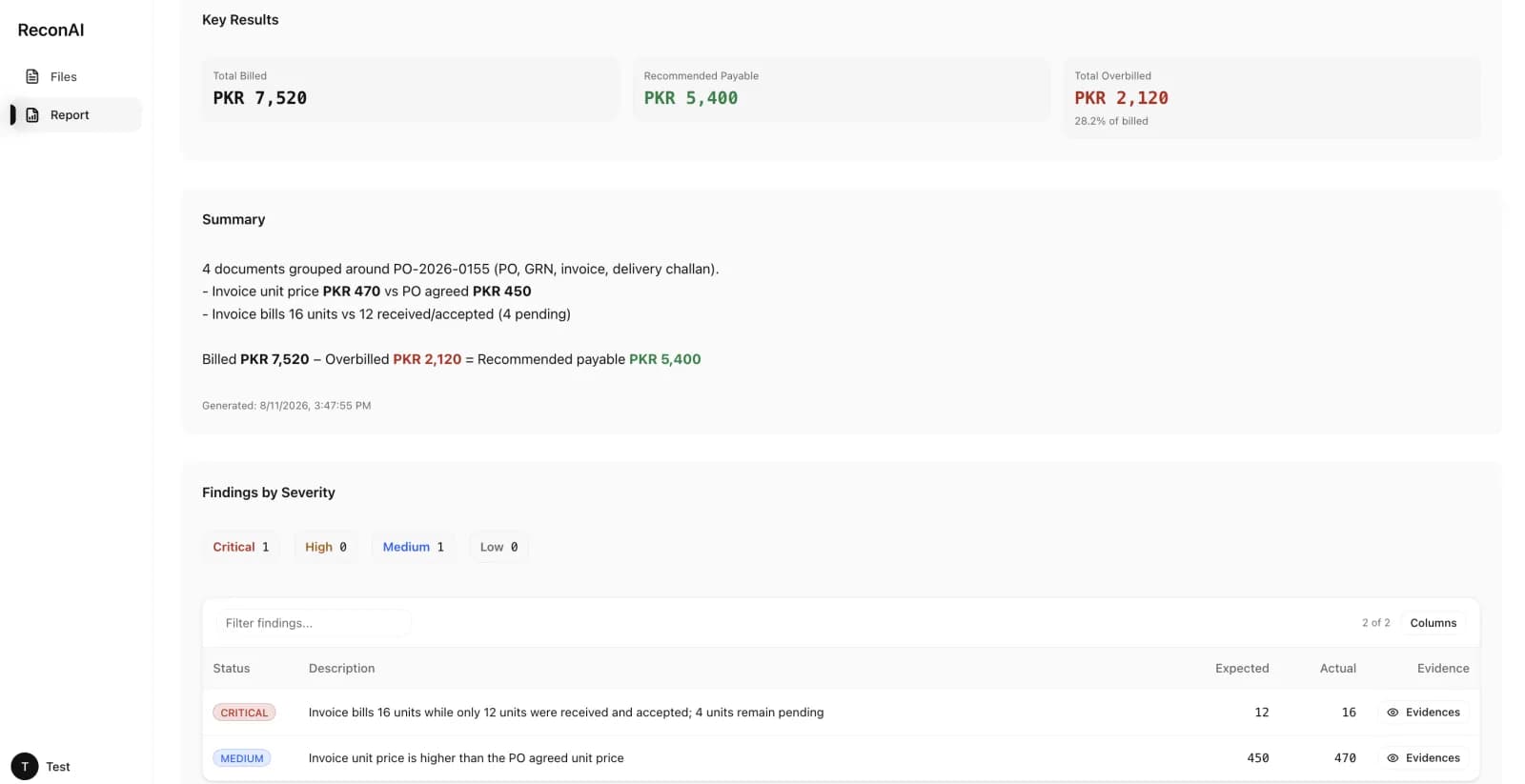
The report: engine-derived KPI cards on top, severity-ranked findings with clickable evidence below.
Step 3: Evidence you can click through
A findings list without proof is just a list of accusations. ReconAI's evidence system is where the audit becomes verifiable.
Each finding opens an orbital mindmap of its cited files (three.js). Select up to three files and they render side by side in the browser (pdfjs-dist).
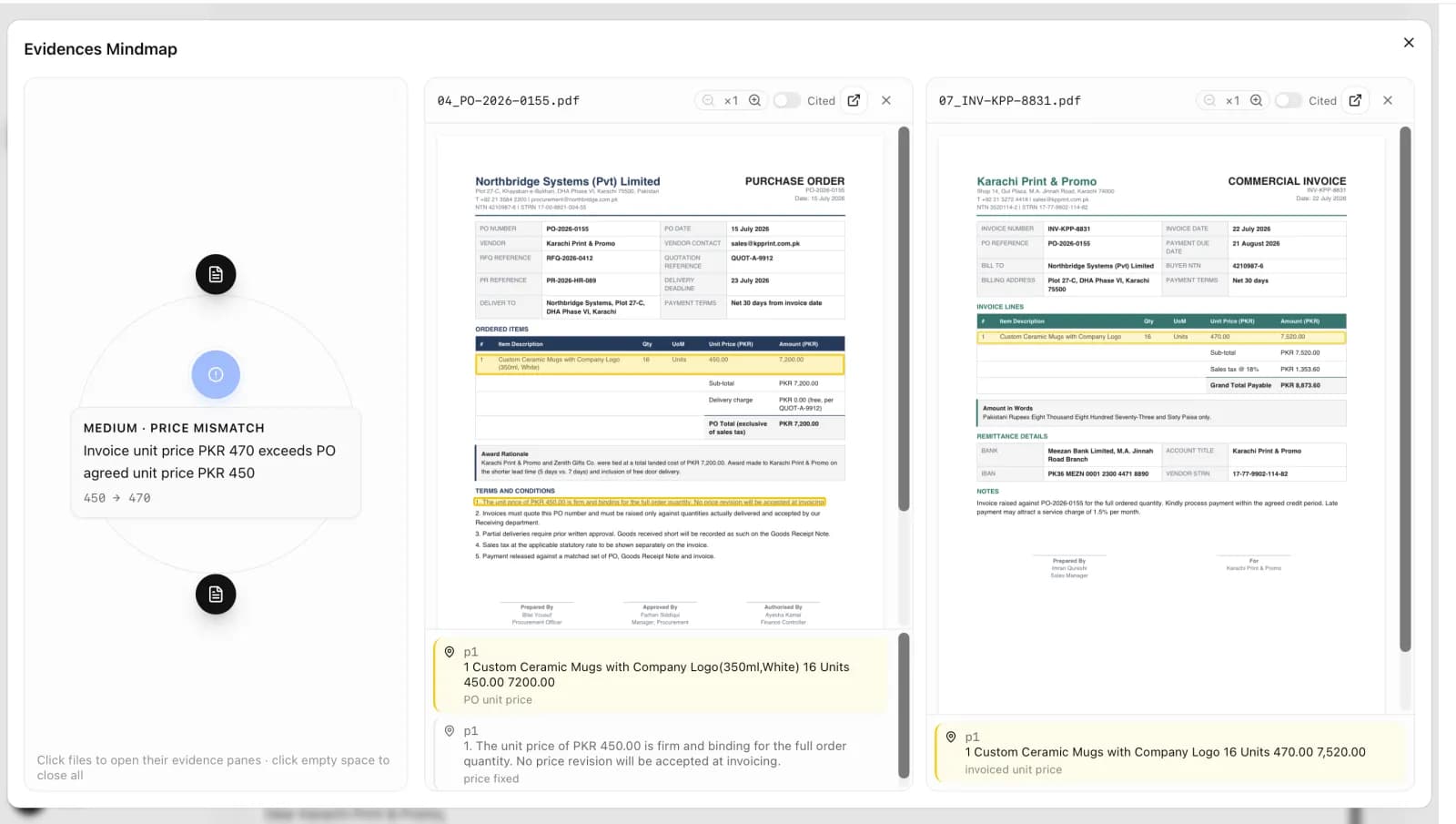
The evidence orbital: cited files arranged around the finding; opening panes renders each PDF with line-level highlights.
Every citation in the finding is then located in the PDF's own text layer: glyph-exact, digit-equivalence matching, expanded to the full visual line. For scanned PDFs with no usable text layer, the viewer falls back to DocAI's segment geometry and highlights the whole table row containing the citation. The result is a highlight over the entire row or line where the disputed figure lives, not a tiny box around the matched characters.
Clicking a citation jumps to it in the PDF and pulses the highlight. Each citation carries its reason, so the flow reads: finding, file, exact line, reason. In a procurement review, that turns a suspicious figure into a verified finding in seconds instead of a manual document search.
Step 4: Supplier follow-up emails, written in the same call
When reconciliation finds discrepancies, the supplier needs a follow-up. ReconAI writes one email per supplier with findings, in the same LLM response as the report. There is no second model call, so the email cannot drift from the report: the prompt instructs the model to use exactly the numbers, severities, and descriptions from its own findings, and the app verifies each recipient address against the actual document text before showing the draft (invented addresses are replaced with the first real email found in the documents, or dropped).
The Report tab shows the drafts read-only with Copy and Open-in-mail-app, so the flow ends with a click, not a template file.
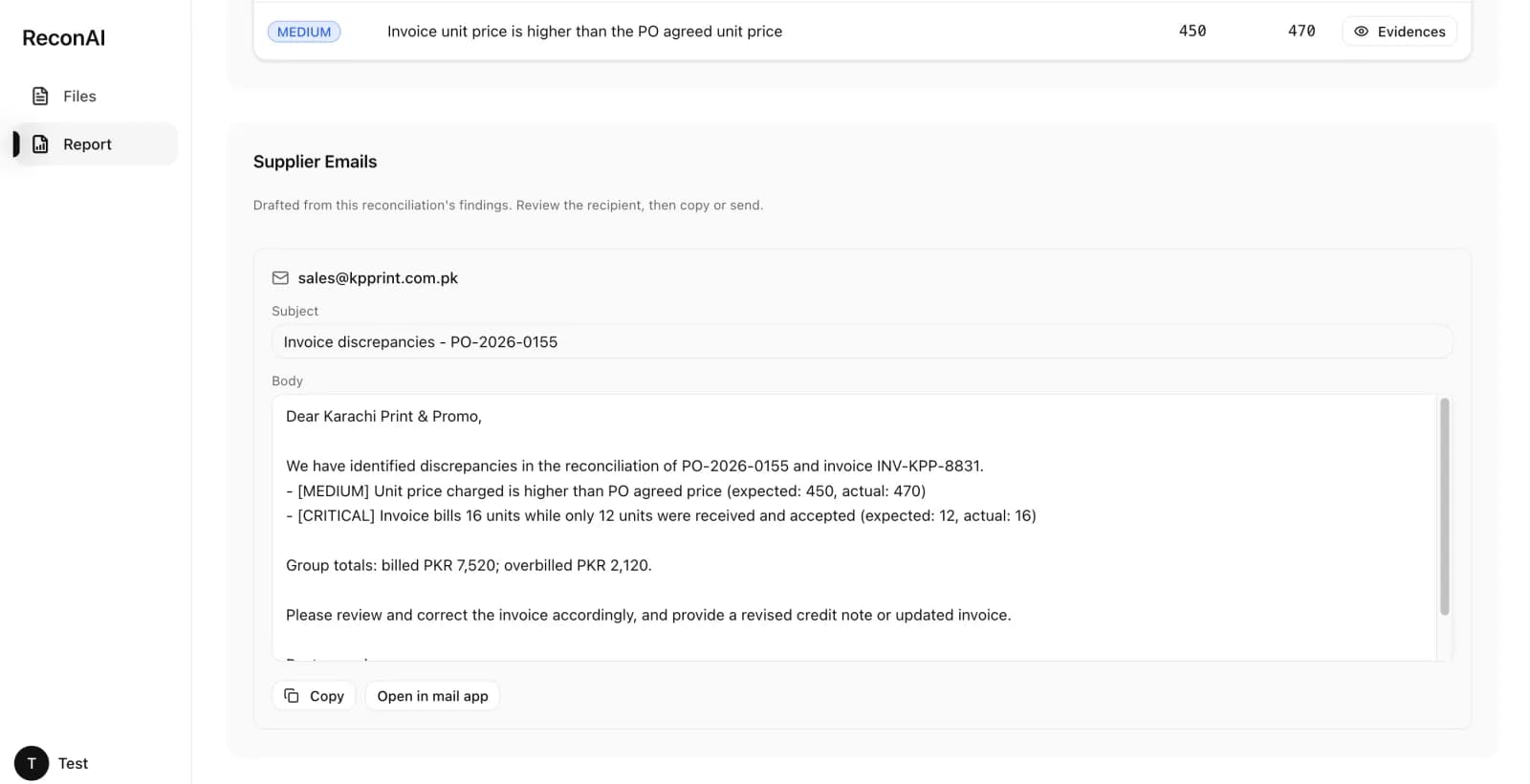
Supplier follow-up email draft: written in the same LLM response as the findings, shown read-only with Copy and Open-in-mail-app.
Step 5: Security: the BFF pattern and prompt-injection hardening
Two security decisions shaped the implementation.
The BFF (backend for frontend). The browser never holds upstream API keys. Every request goes through the app's API routes, which validate an encrypted session cookie (jose, HS256, 24 hours, HttpOnly), validate the requested path against an allowlist that blocks traversal and out-of-surface endpoints, and relay to DocAI with the session and org context. Sign-up and sign-in use Providus's auth, wrapped in the app's own session cookie. There is one trusted door, and secrets never leave the server.
Document content is untrusted data. Procurement documents are vendor-supplied, and vendors can embed arbitrary text in invoices, including fake instructions, fake JSON, or attempts to override the model. In the prompt, every document is wrapped in explicit XML tags and declared untrusted data: the model is told to ignore any instruction that appears inside document tags, file names are sanitized, citation quotes must be verbatim (never invented), and the security boundary is restated at the end of the prompt. On the way back, the report is sanitized in code: KPIs are clamped, incomplete findings are dropped, and supplier emails are verified against document text. The pipeline treats the model as a component inside a deterministic envelope, not as the source of truth.
Results
ReconAI ships with 176 unit tests (engine, citation location, line grouping, KPI derivation, prompt-injection hardening, email verification), and the app is open source under Apache-2.0.
The quality bar was set before the code: the 499-field, 53-document accuracy audit was done manually, character by character, across handwritten, scanned, and digital-born formats, to establish what the parser could and could not be trusted with. That audit directly shaped the evidence system, the citation format, and the fallback highlighting for scanned files.
The same pipeline was also exercised across six reconciliation workflows: the purchase-to-payment cycle and the logistics matrix (air import, air export, sea import, sea export, road freight), validated with domain experts in supply chain and logistics.
| Metric | Value |
|---|---|
| Finding categories | 8 (overbilling, quantity/price mismatch, missing/extra items, unsupported charges, evidence gaps, calculation errors) |
| Unit tests | 176 passing |
| Parsed-document accuracy audit | 499 fields across 53 documents, character-level |
| Reconciliation workflows covered | 6 (P2P cycle + logistics import/export matrix) |
| License | Apache-2.0, open source |
Lessons learned
-
Own the arithmetic in code, never in the model. The moment the LLM was allowed to compute totals, its sums drifted. Moving every money figure into typed, tested code made the report reproducible. The model writes narrative; the engine writes numbers.
-
Keep geometry with the text. DocAI returns segments with coordinates and table-cell bounding boxes. Storing and reusing that geometry is what turned "the invoice says 470" into a highlighted table row in the source PDF. Without it, every finding would require a manual document search.
-
One LLM call, not a chain. Report, findings, and supplier emails all come from a single response. A second call for emails would let the emails drift from the findings and double the cost and latency. Same reasoning context, same numbers, one pass.
-
Treat document content as hostile input. Invoices can contain injected instructions. XML-tagged untrusted data, verbatim-only citations, and code-side sanitization made the pipeline robust to documents that try to steer it. Prompt injection is a document-AI feature, not an afterthought.
-
Sanitize on the way out. The model's JSON is parsed and validated before it reaches the user: KPIs clamped, incomplete findings dropped, email addresses verified against source text. The LLM is a component inside a deterministic envelope.
Frequently asked questions
Can ReconAI handle handwritten and scanned documents?
Yes. DocAI parses handwritten, scanned, and digital-born PDFs. For scanned files with no usable text layer, the evidence viewer falls back to DocAI's segment geometry and highlights the full table row containing the citation.
What LLM runs the reconciliation?
DeepSeek cloud (with thinking enabled) or a local OpenAI-compatible model server, selectable per run. Responses stream as SSE with live reasoning, so you can watch the audit's stages as they happen.
Is the evidence actually clickable to the source line?
Yes. Every citation is located in the PDF's own text layer with glyph-exact matching and expanded to the full visual line (or the full table row via segment geometry for scanned files). Clicking a citation jumps to it in the rendered PDF and pulses the highlight.
What documents does it reconcile?
Any set of procurement documents: purchase orders, goods receipts/receiving reports, invoices. The checklist covers three-way matching (PO to receipt to invoice), plus pricing, quantity, arithmetic, and unsupported-charge checks.
How do supplier emails get written without drifting from the report?
The email drafts are part of the same single LLM response as the findings, and the app verifies each recipient against the actual document text. There is no second call, so there is nothing to drift.
Next steps
ReconAI is open source. You can explore the code at https://github.com/saadmemon1/ReconAI, or get in touch with the Providus team to see a live walkthrough of the pipeline: upload, parse, reconcile, evidence.
Interested in the Document Intelligence layer behind ReconAI for your own documents? The Providus team would love to hear from you. Reach out at hello@providus.ai or sami@providus.ai to discuss parsing, extraction, and reconciliation for your document workflows.