DocVQA Benchmark Results for Providus DocAI Parsing
By Sami Haroon
Most document extraction vendors publish an accuracy number. Very few publish the predictions behind it, the scorer that produced it, or the list of what they got wrong. This post does all three for Providus DocAI on DocVQA, and explains the one design choice that makes the number mean something: the model answering the questions never sees the page.
Why DocVQA, and why no image
DocVQA is a public benchmark of 5,349 questions asked about 1,286 real scanned documents: forms, letters, reports, tables and charts from the Industry Documents Library. Each question has a short answer taken verbatim from the page, and the standard metric, ANLS (Average Normalized Levenshtein Similarity), gives credit for a close match and zero for anything below half similarity.
DocVQA is normally used to score vision models that look at the page image and answer directly. We use it to score something narrower and, for a buyer of document parsing, more useful: is the answer in the parse output? So the question-answering model in our setup receives only what DocAI extracted, the markdown and the grounding JSON with every element's text and bounding box. No image at answer time. If DocAI missed a value, misread a number or lost a table cell, the model cannot recover it by looking at the picture. The score is a ceiling on the parser, not on the language model's eyesight.
The result
May 2026 campaign result, DocVQA validation set, all 5,349 questions scored, none excluded.
| Metric | Value | What it measures |
|---|---|---|
| Official ANLS | 0.9066 | The standard DocVQA metric. Best normalized Levenshtein similarity against the accepted answers, zero below 0.5. |
| Normalized exact match | 88.3% (4,725) | The prediction equals an accepted answer after lowercasing and removing punctuation, accents and extra spaces. |
| Case-insensitive exact match | 84.2% (4,506) | Exact after lowercasing and trimming only. |
| Exact + near match | 93.1% (4,981) | 4,725 exact plus 256 near matches. A near match has normalized Levenshtein similarity of at least 0.35 to an accepted answer, contains it or is contained by it, or shares most of its tokens. Useful for separating formatting gaps from missing answers; not a leaderboard metric. |
Three examples of near matches from the run, so the last row is concrete: "May 3, 2006 at 9:00 a.m. local time" for the accepted answer "May 3, 2006"; "quality issues" for "Quality"; "Week 2" for "2". The information was on the page and in our output. The model answered with more than the annotator wanted.
Every number in that table is recomputed by a small standalone script from the published predictions file, and the check runs in GitHub Actions on every push. If the README and the data ever disagree, the build fails.
What was running
| Role | Model |
|---|---|
| Parsing | DocAI parsing pipeline (layout, OCR, vision) |
| Question answering | gpt-5.4-mini and gpt-5.4 (OpenAI), temperature 0, grounded context up to 24,000 characters, 128 output tokens |
DocAI runs the same pipeline hosted or on-prem. An on-prem customer with no internet access runs everything on one machine with their own local models; the cloud service uses hosted models. Every result we publish names the question-answering model that produced it, because the number belongs to the combination, not to the parser alone.
What the output looks like
The benchmark is a proxy. The product is the artifact. Here are two of the 1,285 pages, parsed with DocAI, with the grounding element that contains the answer drawn on the page. Nobody drew these boxes by hand; a script searches the grounding JSON for the answer text and draws the element it finds.
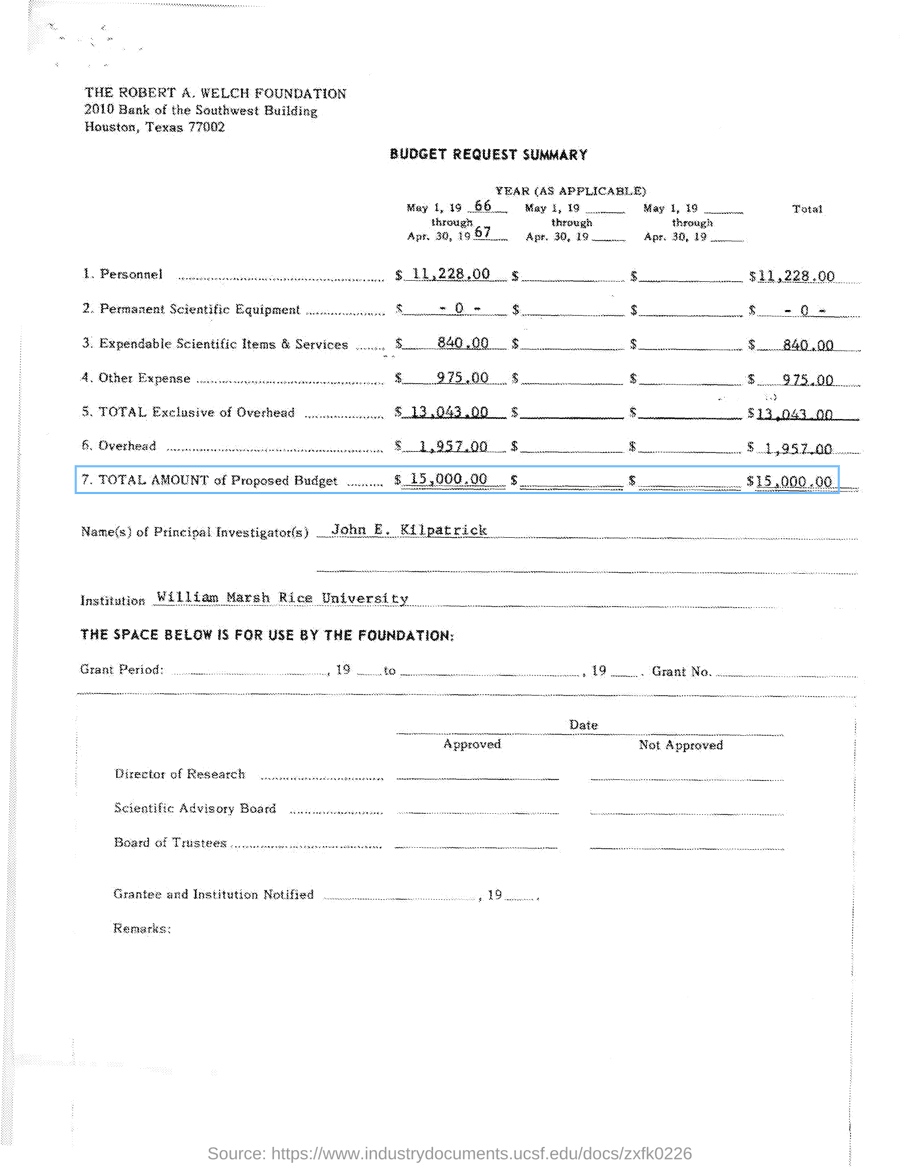
Question: according to the budget request summary, what is the total amount of the proposed budget? Answer: 15,000.00. DocAI returned the table with 15 cells from ruled-line geometry and the total row as its own element.
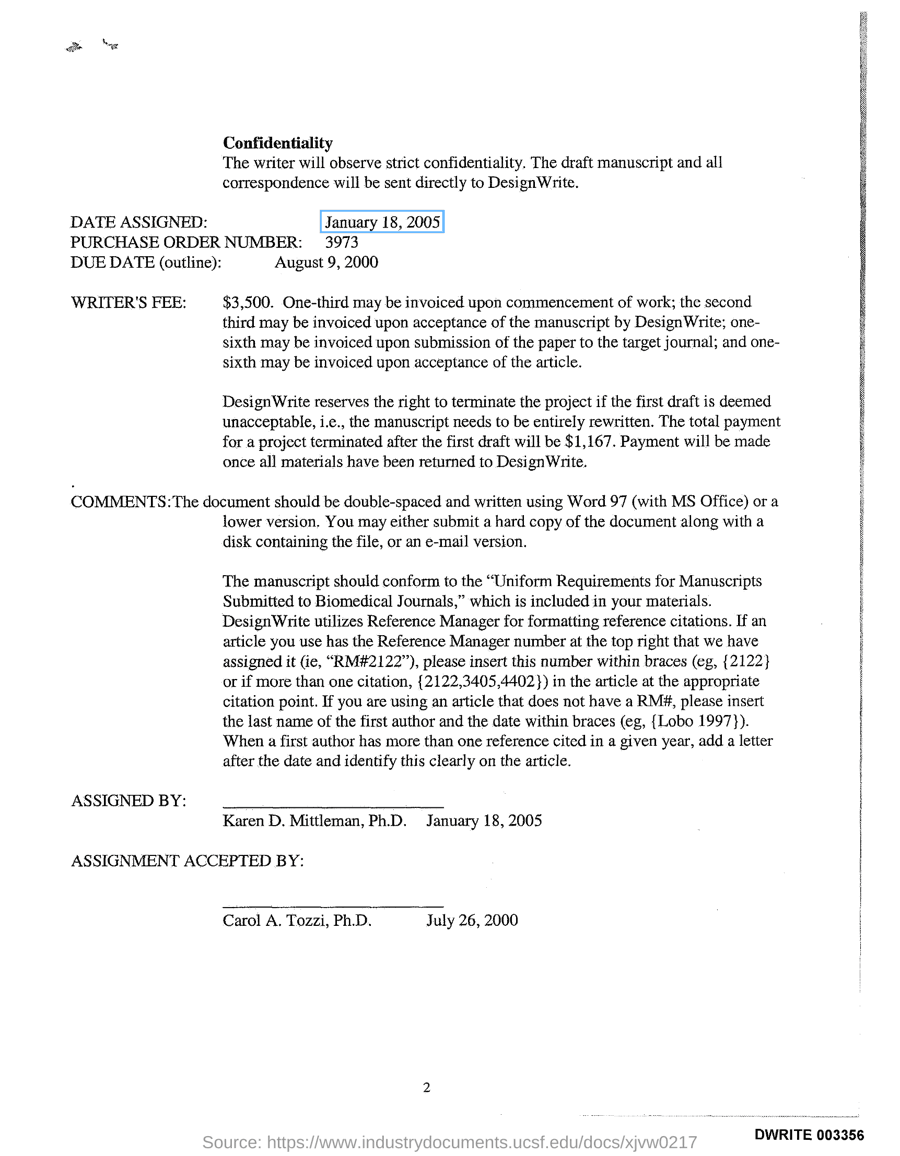
Question: what is the Date Assigned as per the document? Answer: January 18, 2005. The element is 16 characters wide, so a downstream system can highlight exactly that span. This is the element as DocAI returned it:
{
  "id": "p1_e0004",
  "type": "text",
  "label": "text",
  "bbox": { "x1": 0.357, "y1": 0.183, "x2": 0.492, "y2": 0.2 },
  "pixel_bbox": [357, 183, 492, 200],
  "content": "January 18, 2005",
  "ocr_content_len": 16,
  "confidence": { "score": 0.75, "route": "medium", "vlm_applied": false },
  "markdown_anchor": "p1-e0004"
}
Coordinates come normalized and in pixels. The confidence block says whether the element was routed to the vision model for a second look. The markdown anchor links the element to its place in the markdown, so a citation in the text can be traced back to a box on the page. Table elements add a cells array with row, column, span, box and text.
Where the misses are
456 of 5,349 questions score zero under official ANLS. We grouped them by the diagnostic the pipeline recorded, because a miss list is only useful if it says what to fix.
| Group | Count | What fixes it |
|---|---|---|
| Answer text missing from the parse output | 272 | Extraction. The largest group by far. The parser has moved since May (a routing fix for ruled tables, geometry-first table cells, margin and header OCR), so the first step is to re-parse and re-count. |
| Evidence present, model chose wrong | 178 | Question answering. Pass the whole parsed document instead of a 24,000-character window; a stricter grounded prompt. |
| Evidence missing or not retrieved | 6 | Falls out of the extraction work. |
A further 168 questions score above zero but below one. Ninety-five of those are formatting mismatches: the right value in the wrong shape, which is prompt and post-processing work, not parsing work. Sixty-six are partial extractions where part of the answer text never reached the output.
The arithmetic for the next target is simple. An ANLS of 0.99 needs roughly 55 or fewer zero-score questions out of 5,349, from 456 today. Extraction has to deliver most of that. Question-answering work alone cannot get there.
What happens next
The next run is one configuration declared before it starts, one pass over all 5,349 questions, scored with official ANLS and exact match, with a frontier question-answering model in place of gpt-5.4-mini. After the validation run, the same configuration goes to the DocVQA test set through the Robust Reading Competition portal, where the answers are private and the score is the portal's, not ours.
Test it on your own documents
A benchmark number tells you how we do on DocVQA's documents. The number that matters is how we do on yours. The pipeline behind this result is the one behind the DocAI API. Create an account, make an API key under Settings, upload a document with auto_parse, and fetch the markdown and grounding JSON for it. Feed the markdown to the question-answering model of your choice and score it against your own answer key. The repository below has the scorer, the prompt and the scripts, so the setup takes an afternoon.
Everything in this post, the predictions file, the scorer, the miss analysis and the reproduction scripts, is at github.com/ProvidusAI/DocVQA. The API reference is at api.providus.ai/docs and the product documentation at docs.providus.ai. Questions, larger evaluations or an on-prem trial: hello@providus.ai.